
Overview (pre-alpha) #


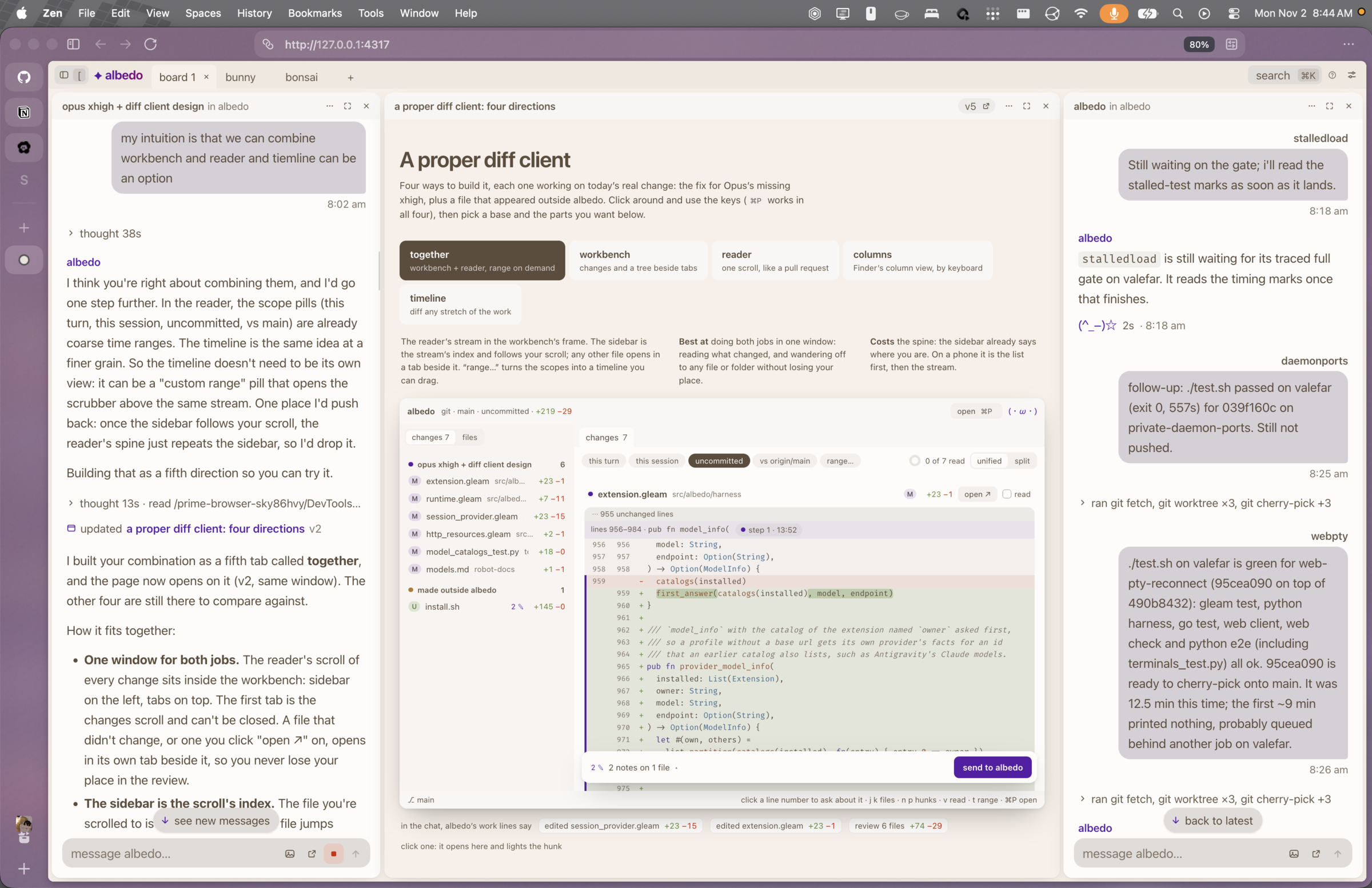
Albedo is a coding agent daemon written in Gleam on BEAM, with a Go terminal client, a Svelte web client, and a Python execution kernel. Clients connect to the daemon to create and control sessions. The kernel gives agents a persistent Python workspace for running tools and working with data.
The Python REPL design is based on prime-agent.
Contributing #
Read the repository instructions and Change Albedo before making a change. Use the robot documentation index to find subsystem owners, contracts, and contribution guidance. The documentation index links API contracts and operator guides.
Build and install #
The CLI uses the Charm stack.
# build native go cli
go -C cli build -o bin/albedo ./cmd/albedo
./cli/bin/albedo

# or to install it globally
go -C cli install ./cmd/albedo
albedo
When installed globally outside the checkout, set ALBEDO_ROOT to the absolute
repo path if the daemon needs to be started:
ALBEDO_ROOT=/path/to/albedo albedo
or embed the root at install time:
go -C cli install -ldflags "-X main.buildRoot=$(pwd)" ./cmd/albedo
The default Nix package includes the client, compiled server, Python runtime, and Chrome Headless Shell for browser automation. The development shell also includes the browser:
nix build .#albedo
nix run . -- --help
nix-build -A default   # without flakes: the root default.nix goes through flake-compat
# package checks, with a local mock provider (no model credentials):
python3 test/manual/nix_package_smoke.py "$PWD/result/bin/albedo"
ALBEDO_NO_BROWSER=1 ALBEDO_TEST_BINARY="$PWD/result/bin/albedo" python3 test/daemon/integration.py
The client and server also build separately:
nix build .#albedo-client --out-link result-client
nix build .#albedo-server --out-link result-server
ALBEDO_DAEMON="$PWD/result-server/bin/albedo-daemon" ./result-client/bin/albedo
Without nix, you need Gleam v1.19.0
gleam compile
To install the client and declare a login user service with home-manager, import
albedo.homeModules.default. See
Manage albedo with home-manager for configuration and
migration steps.
optional: view, which lets the model see its changes and code as highlighted
images for a final review pass. needs cargo.
native/render/install.sh # then enable `view` in /extensions
CLI usage #
Run albedo to open the terminal interface, or use --prompt to print a reply:
albedo -p "Explain this project"
albedo --prompt "Run the checks" --session SESSION_ID --timeout 10m
albedo resume SESSION_ID
albedo sessions --json
albedo sessions read SESSION_ID 3      # the newest 3 turns (default 1); --json for structure
albedo sessions send SESSION_ID "message"
Session IDs can be shortened to any unique prefix. Run albedo --help or
albedo COMMAND --help for command options.
To inspect disk usage without starting the daemon, run albedo storage --json
or albedo storage --sessions. Offline database inspection and cleanup use the
local daemon executable without starting its server. Set ALBEDO_DAEMON to a
packaged executable or ALBEDO_ROOT to a source checkout. These storage
commands do not require Python. To clean up local files, stop the daemon first:
albedo daemon --stop
albedo storage prune --backups
Cleanup shows a preview and asks for confirmation. To permanently delete
sessions, use albedo storage prune --session SESSION_ID, repeating --session
for each full ID. Add --yes to skip confirmation in scripts.
Editor usage #
Configure your ACP editor to run albedo acp. Use an absolute executable path
if albedo is not on the editor's PATH.
The editor uses your existing provider configuration. Run albedo login in a
terminal if no provider is configured. Execution requires a local daemon and
workspace. File tools use saved files, and closing the editor leaves accepted
work running.
The ACP reference covers model selection, sessions, cancellation, and editor MCP servers.
Web usage #
The web client is a canvas of chat windows on a desktop and one chat at a time
on a phone. It lives in web/ (Svelte). The Nix package includes it, so
albedo web works straight away:
nix run . -- web           # serves on 127.0.0.1:4317 and opens the browser
albedo web --port 0 --no-open
nix build .#albedo-web     # just the built client
From a checkout without Nix, build it once first:
npm --prefix web ci
npm --prefix web run build
albedo web finds or starts the daemon the same way the terminal client does,
and keeps the daemon's token to itself. It prints a link that signs the browser
in, so don't share it. It only answers on localhost unless you allow a network:
albedo web --allow 10.0.0.0 --allow 100.64.0.0   # home LAN and tailnet
albedo web --allow 192.168.1.0/24 --save         # remember it for next time
albedo web --save                                # forget the saved networks
A network is CIDR, or an address whose trailing zeros stand for any (10.0.0.0
is 10.0.0.0/8). It then also listens on this machine's addresses in those
networks, prints a sign-in link for each, and refuses devices from anywhere
else. Set ALBEDO_WEB_DIST to serve a client built somewhere else.
What it does: new sessions (pick a folder, provider, model and effort), live
chats with images, / commands and a model picker in the composer, reviews of a
turn's changes on highlighted diffs, and notes you can tie to a message, a
window or diff lines and send back as one message. Press ⌘K for everything else.
To work on the client, run the Vite dev server against the running daemon:
npm --prefix web run dev   # http://localhost:5173, restart it after the daemon restarts
npm --prefix web run check # svelte-check
The dev server listens on the local network with no sign-in, so other devices at
home can open it, and anyone who reaches it gets full control of the daemon.
Only run it on a network you trust. robot-docs/web.md describes how the client
is put together.
formatting
nix fmt                         # treefmt: Nix, Gleam, Go, Python, and shell files
pre-commit install              # once per checkout; available in `nix develop`
pre-commit run --all-files       # format, lint Python, and type-check Python
test/quick.sh                   # every static check, without a hook
gleam format src test           # fix Gleam formatting
ruff format priv/python test    # fix Python formatting
ruff check                      # lint Python
ty check                        # type-check the kernel, plugins, and tests
The commit hook formats staged files and runs the Python checks; it needs
gleam on PATH. jj runs no git hooks, so with jj run test/quick.sh before
each commit.
tests
./test.sh               # gleam, native go cli, and daemon suites
go -C cli test ./...    # native go cli tests
go -C cli vet ./...     # native go cli vet
gleam test              # gleam suite
test/manual holds opt-in checks that need a packaged binary or real
credentials.
todo
- [] flesh out plugin system more
- [] sdk and -p, command to print out most recent assistant message from session
- [✓] compaction strategy plugins LCM and snapcompact
- [] compaction evaluations: old-fact recall, corrected instructions, tool pairing, images, restarts, and token/cost comparisons
- [✓] subagents plugin
- [] social plugins like discord
- [✓] plugins like heartbeat and skills
- [ish] oauth that we shamelessly rip from omp
- [] ai powered approve for me (jev/llm)
- [] improve verbose mode on tui
- [ish] webui: canvas on desktop, single chat on phones
- [] connect to other albedos on tui/webui and manage sessions
- [ish we have remote but model opts into it, not yet able to have the model natively act in a different machine] ability to offload tools like python/bash onto other machines/containers
license #
albedo is Copyright © 2026 okami.mom, ptr.pet and aly.codes, and the other contributors in its git history, under the GNU Affero General Public License v3.0 only with the Classpath exception, so independent modules combined with albedo may carry their own licenses. See AUTHORS.md and THIRD_PARTY_NOTICES.md.